Update Settings
Configure automatic software update schedules for Miniservers
Key Features
Hierarchical Configuration
Same inheritance model as backups:
- Workspace default settings
- Structure element settings
- Device-level overrides
Settings cascade from parent to child. Visual indicators show configured levels.
Update Execution
- Automatic update checks at scheduled time
- Downloads and installs available updates
- Miniserver restarts automatically if needed
- Activity log records all update events
Time Configuration
- Set specific time for update checks
- Format: HH:MM (24-hour)
Configuration Steps
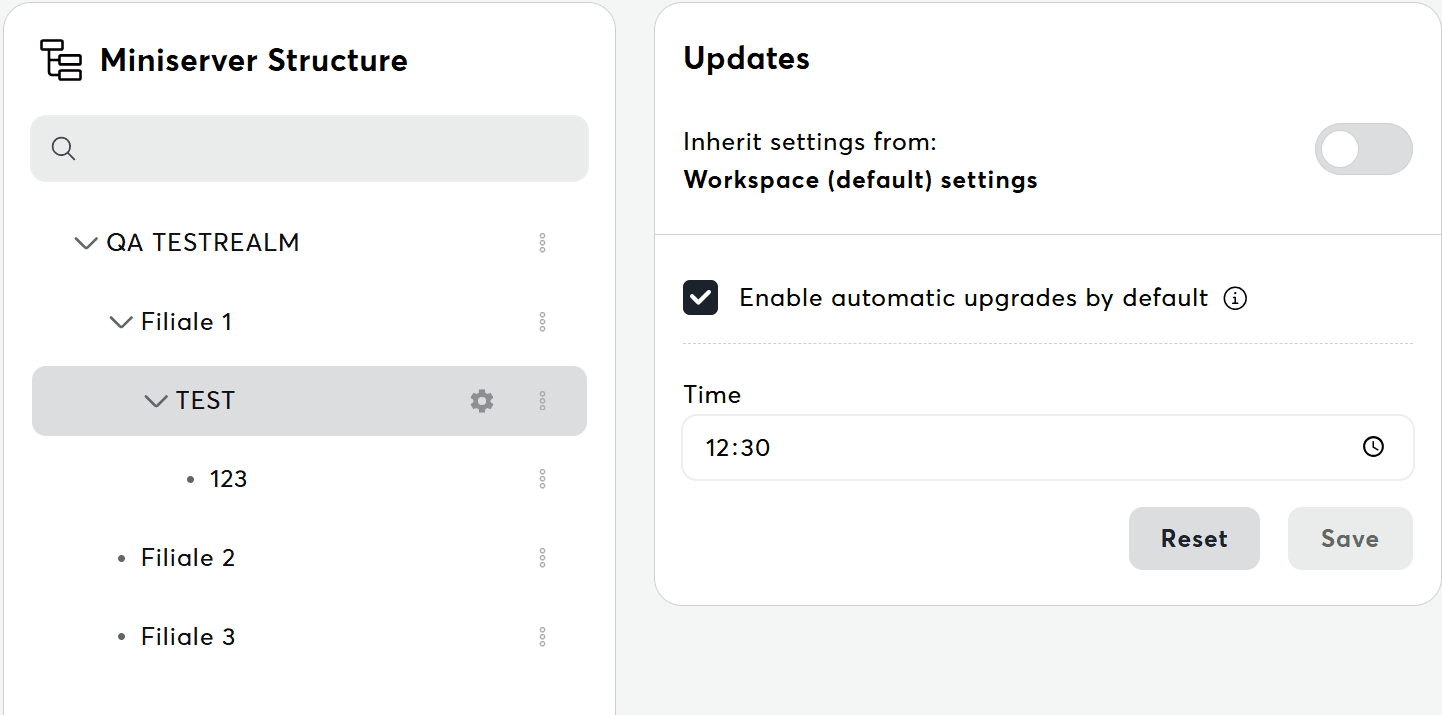
- Navigate to Settings: Go to Settings → Miniserver → Updates
- Select Scope: Use structure tree to select configuration level (workspace, folder, or device)
- Configure Update Schedule:
- Enable/disable automatic updates
- Set execution time
- Optionally enable "Latest Update Level"
- Save Settings: Click "Save" to apply. Updates scheduled immediately.
Latest Update Level
- Enable to always update to the latest stable release version
- Recommended for most users
- Disable to stay on a specific version
Update channels (Release, Beta, Alpha) are configured per Miniserver in the Miniserver Settings tab, not at the workspace level.
Requirements and Restrictions
Miniserver Requirements
- Must be connected and online
- Must have active license (not in trial)
- Firmware version must support Exosphere
User Permissions
- Administrator or Editor role required for settings
- Miniserver user needs "Miniserver Update" permission
Related Documentation
For troubleshooting update issues, see Settings Issues.