User Permissions & Roles
Permission matrix, role hierarchy, and access control in Exosphere
User Roles Overview
Role Hierarchy
| Role | Description |
|---|---|
| (Workspace) Owner | Full access |
| Administrator | Administrative access |
| Editor | Device operations and content management |
| Viewer (with Loxone Config) | Read-only access + Loxone Config file management |
| Viewer | Read-only access |
Role Descriptions
| Role | Permissions and Access |
|---|---|
| Owner | Full control - can do everything. All permissions including deletion. Cannot be removed by other users. Full system administration access. |
| Administrator | Administrative access to workspace. User and device management. Content creation and management. |
| Editor | Device operations and content management. Cannot manage users or workspace settings. |
| Viewer (with Loxone Config) | Read-only access to content. Can additionally upload and manage Loxone Config program files. |
| Viewer | Read-only access to content. View dashboards, charts, and reports. Cannot modify any content or settings. |
Role Selection
Give users the minimum permissions they need.
Permission Inheritance
Hierarchical Structure
Permission inheritance flows from higher to lower privilege levels:
- Owner inherits all permissions
- Administrator inherits Editor + Viewer permissions
- Editor inherits Viewer permissions
- Viewer (with Loxone Config) has Viewer permissions + program file management
- Viewer has base read permissions
| Role | Inherits From | Additional Permissions |
|---|---|---|
| Owner | All roles | Billing, deletion, system admin |
| Administrator | Editor, Viewer | User management, workspace settings |
| Editor | Viewer | Device operations, content management |
| Viewer (with Loxone Config) | Viewer | Program file upload and management |
| Viewer | None | Read-only access |
Detailed Permission Matrix
Workspace Management
| Permission | Owner | Administrator | Editor | Viewer |
|---|---|---|---|---|
| Create Workspace | ✅ | ✅ | ✅ | ✅ |
| Delete Workspace | ✅ | ❌ | ❌ | ❌ |
| Modify Workspace Settings | ✅ | ✅ | ❌ | ❌ |
| View Workspace Settings | ✅ | ✅ | ✅ | ❌ |
User Management
| Permission | Owner | Administrator | Editor | Viewer |
|---|---|---|---|---|
| Invite Users | ✅ | ✅ | ❌ | ❌ |
| Remove Users | ✅ | ✅ | ❌ | ❌ |
| Change User Roles | ✅ | ✅ | ❌ | ❌ |
| View User List | ✅ | ✅ | ❌ | ❌ |
Device Management
| Permission | Owner | Administrator | Editor | Viewer |
|---|---|---|---|---|
| Add Devices | ✅ | ✅ | ✅ | ❌ |
| Remove Devices | ✅ | ✅ | ✅ | ❌ |
| Edit Device Settings | ✅ | ✅ | ✅ | ❌ |
| View Device Details | ✅ | ✅ | ✅ | ✅ |
| Device Operations | ✅ | ✅ | ✅ | ❌ |
| Bulk Operations | ✅ | ✅ | ✅ | ❌ |
| Device Backup | ✅ | ✅ | ✅ | ❌ |
| Device Update | ✅ | ✅ | ✅ | ❌ |
| Device Reboot | ✅ | ✅ | ✅ | ❌ |
Content Management
| Permission | Owner | Administrator | Editor | Viewer |
|---|---|---|---|---|
| Create Dashboards | ✅ | ✅ | ✅ | ❌ |
| Edit Dashboards | ✅ | ✅ | ✅ | ❌ |
| Delete Dashboards | ✅ | ✅ | ✅ | ❌ |
| Share Dashboards | ✅ | ✅ | ✅ | ❌ |
| View Dashboards | ✅ | ✅ | ✅ | ✅ |
| Create Charts | ✅ | ✅ | ✅ | ❌ |
| Edit Charts | ✅ | ✅ | ✅ | ❌ |
| Delete Charts | ✅ | ✅ | ✅ | ❌ |
| View Charts | ✅ | ✅ | ✅ | ✅ |
Data Management
| Permission | Owner | Administrator | Editor | Viewer |
|---|---|---|---|---|
| Create Value History | ✅ | ✅ | ✅ | ❌ |
| Edit Value History | ✅ | ✅ | ✅ | ❌ |
| Delete Value History | ✅ | ✅ | ✅ | ❌ |
| Schedule Reports | ✅ | ✅ | ✅ | ❌ |
| View Value History | ✅ | ✅ | ✅ | ✅ |
| Export Data | ✅ | ✅ | ✅ | ❌ |
| Import Data | ✅ | ✅ | ✅ | ❌ |
| Manage Databases | ✅ | ✅ | ✅ | ❌ |
System Administration
| Permission | Owner | Administrator | Editor | Viewer |
|---|---|---|---|---|
| System Settings | ✅ | ✅ | ❌ | ❌ |
| License Management | ✅ | ✅ | ❌ | ❌ |
| Backup Management | ✅ | ✅ | ✅ | ❌ |
| Update Management | ✅ | ✅ | ✅ | ❌ |
Notifications
| Permission | Owner | Administrator | Editor | Viewer |
|---|---|---|---|---|
| Manage Notifications | ✅ | ✅ | ✅ | ❌ |
| Configure Alerts | ✅ | ✅ | ✅ | ❌ |
| View Notifications | ✅ | ✅ | ✅ | ✅ |
| Email Notifications | ✅ | ✅ | ✅ | ✅ |
| SMS Notifications | ✅ | ✅ | ✅ | ❌ |
Permission Audits
Check user permissions regularly.
Hierarchical Permissions in ENTERPRISE Workspaces
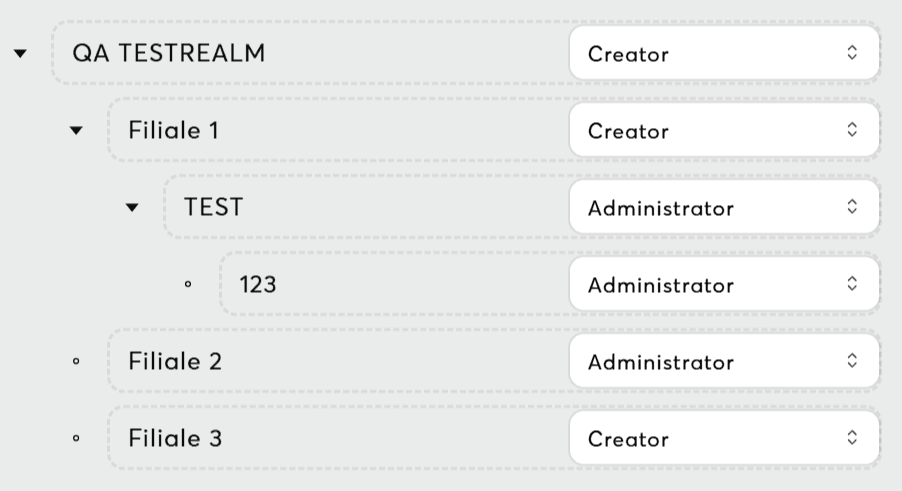
Workspaces with ENTERPRISE licenses feature structure-aware permissions that align with the workspace hierarchy. Key points to understand:
- Hierarchical Restrictions: When a role is assigned to a structure element, child elements can only inherit equal or more restrictive permissions (never less restrictive).
- Example: If a floor is assigned Editor permissions, rooms within that floor cannot have Administrator or Owner roles; they can only have Editor, Viewer (with Loxone Config), or Viewer.
- Consistency and Integrity: This rule ensures a consistent permission hierarchy across the workspace. It also applies when revoking permissions, maintaining strict access control throughout the structure.
For further information on workspace hierarchy, refer to Structure Panel & Sidebar.
Troubleshooting
See Permission Issues for detailed troubleshooting guide.
Related Documentation
- Team Management - Invite and manage team members
- Authentication & Login - Account creation and login
- License Management - User capacity and subscription limits
- Permission Issues - Troubleshooting permission problems