Alerting & Notifications
Configure automatic notifications about critical states and events in your workspace
Overview
The Loxone Exo Platform's alerting and notifications system enables proactive notifications about critical states and events. It supports multiple alert types, multiple communication channels (email and SMS), and flexible notification rules.
Telemetry alert rules are configured separately
This page covers workspace-level notifications for device status, health, tasks, licenses, and trials. To create telemetry rules for sensor values or missing data, use the Alerts section.
Features
Alert Sources
The system monitors various sources and generates corresponding alerts:
- Device Status - Connection problems and status changes
- Device Health - Device health and network connections
- Device System Messages - Critical system messages from Miniserver
- Task Management - Overdue tasks and new assignments
- License Management - Expiring or expired license codes
- Device Trials - Expiring or expired trial licenses
Delivery Types
Instant Alerts (instant):
- Sent instantly upon detection
- Suitable for critical events
- Direct notification without delay
Daily Alerts (daily):
- All alerts from one day are summarized in one email
- Sent once daily
- Ideal for non-critical issues
- Reduces notification frequency
Weekly Alerts (weekly):
- All alerts from one week are sent in summary
- Maximum reduction of notifications
- Suitable for informational purposes
Disabled (off):
- No notifications for this alert type
Severity Levels
For Device Status & Health:
error- Critical error stateswarning- Warnings and non-critical problems
For System Messages:
critical- System-critical messagesimportant- Important informationwarning- General warnings
Configuration
Accessing Notification Settings
- Navigate to the Settings page in the portal
- Select the Notifications menu item
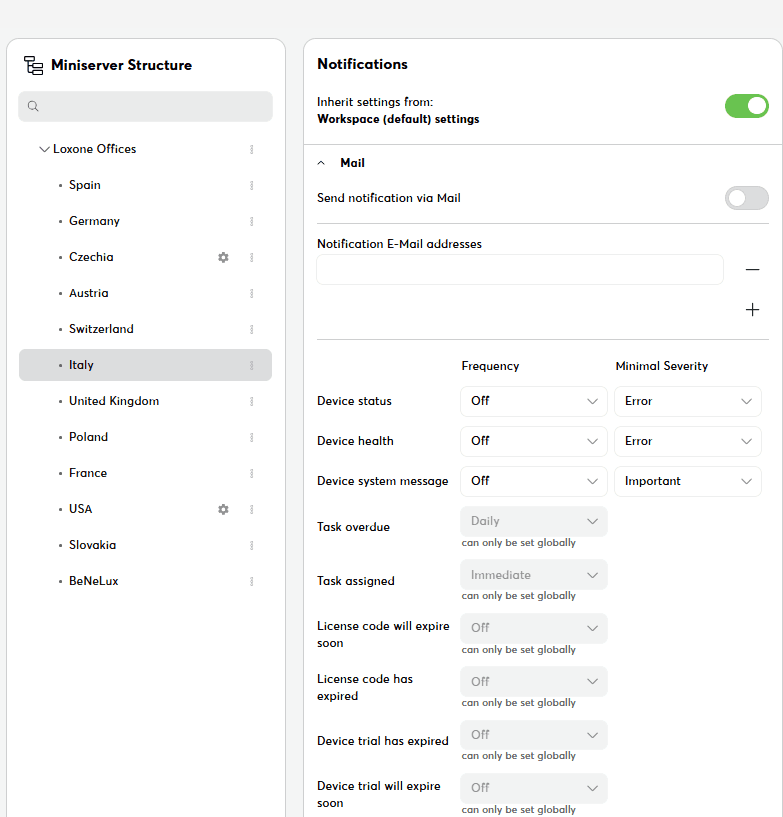
- The structure tree shows the workspace root and all elements with notification settings
Structure Element Settings
Location: Select the structure element in the structure view
Configurable Parameters:
Email Notifications
- Enable Email - Main switch for email notifications
- Email Addresses - Add one or more email addresses
- Frequency per Alert Type - Off, Instant, Daily, Weekly
- Minimum Email Severity - Threshold for sending
SMS Notifications
- Enable SMS - Main switch for SMS notifications
- Phone Numbers - Add one or more mobile phone numbers
- Frequency per Alert Type - Off, Instant, Daily, Weekly
- Minimum SMS Severity - Threshold for sending
Element-Specific Settings
Inheritance: Elements inherit default settings from the workspace root but can be overridden
Configurable Alert Types for Elements:
- Device Status, Health, System Messages (all configurable)
- Task Assignments (only
offorinstant) - Overdue Tasks (only
off,daily,weekly- noinstant) - License & Trial Alerts (inherit from workspace root)
Inheritance Mode:
- Elements can inherit settings from parent
- Or define their own settings
- Toggle switch enables/disables inheritance
Related Documentation
- Alerts – Telemetry alert rules and recipient groups
- Device Management
- License Management
- Troubleshooting